

Welcome to our Metal Weight Calculator, your one-stop tool to instantly estimate the theoretical weight of various metal shapes based on their dimensions and material type. Whether you're working with steel, aluminum, copper, or any other industrial material, this calculator helps you make accurate calculations for Round, Square, Rectangle, Hexagonal, Tubular, Ring, Pipe, and more profiles.
This powerful tool saves time and reduces guesswork, ensuring you can plan logistics, costing, and procurement more efficiently.
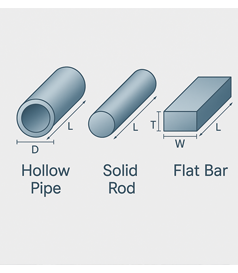
Select Material :- Choose the type of metal from the drop-down list (e.g., Steel, Aluminum, Copper, etc.). Each material has a default density used for accurate calculation.
Choose Shape :- Pick the geometric shape of your metal from the dropdown: Round, Square, Rectangle, Hexagonal, Octagonal, Sheet/Plate, Circle, Tubular/Pipe, Ring (Each shape has its own input fields depending on dimensions.)
Enter Dimensions :- Input the required dimensions such as: Diameter, Length, Width, Thickness (Units can be switched between inches, mm, feet, etc.)
Quantity :- Enter how many pieces you want to calculate the weight for.
Calculate :- Press the Calculate button and the system will show you the Calculated Weight in both Kilograms (Kgs) and Pounds (Lbs).